
Yelena Dobric
Yelena Dobric
Pharmaceutical conversational AI experience strategy
SITUATIONProblem to solve
Client was Co-Pay Assistance Division of a major pharma company. Research showed that 20% of enrollments fail or are abandoned.Success metric
● Conversational AI targeted to solve 5% of abandoned enrollment.● Any decrease in call volume is success, for both patients and employees.
Requirement: Future-ready2 key stakeholders statements:
● “We don’t want to implement something today, that won’t be relevant 3yrs from now.”● “I want a “bold and visionary” proposal.”Tech already in placeSecure Messaging service. There were also lots of other systems, but for the purposes of this presentation, only text messaging is relevant.TASK● Interview users
● Weave a user journey together
● Uncovers current state pain points
● Outline future state potential solutions.In terms of UX breakdown of my time, this project was:● 45% user research, I interviewed client's employees
● 45% strategy, that included analysis & synthesis of what we heard in interviews
● Strategy includes building 2 Mural boards (current state and future state)
● 10% UI quick mock-up of a client dashboardExplain to clients how conversational AI works, and get them comfortable with it
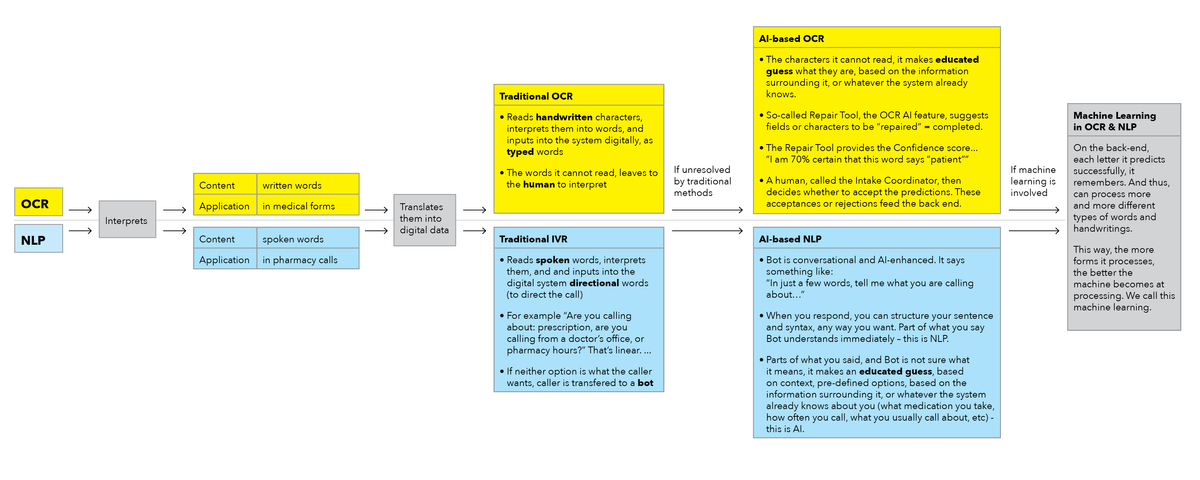
I have found that, in order to explain how AI and ML work, it’s best practice to use an example audience is already familiar with. Healthcare clients are all familiar with OCR (Optimal Character Recognition), because OCR processes faxed forms, filled by hand, and translates them into digital data.
So I used OCR to explain NLP (Natural Language Processing): OCR interprets written words while NLP interprets spoken ones.
Moving between IVR and Bot is seamless to the user.
ACTION
I interviewed:
● Intake Coordinators who receive forms and work with OCR
● Case Managers who communicate with doctors and patients, to ensure all documents and information is complete and accurate
● Reimbursement Specialists who communicate with insurance companies and pharmacies
● Patient Navigators who communicate with patients to keep them informed throughout the process, answer questions, and basically hold patient's hand
● Call Center agents who service both patients and employees; they answer patient questions and guide patients through filling out forms online, and answer employee questions and/or triage employee calls
Employee Interviews revealed:
Patients call the call center for:
● 50% of calls cover standard, simple responses, and triaging calls to respective areas.
● 50% calls are more complex, request human high touch, and last for up to 45 minutes.● Agents handle 80-90 cases per day.
Employees call the call center for:
To be connected to another department, to ask for someone’s contact info, or to ask how some internal system work.Employees told us that doctors, nurses and patients face the following challenges:● 70% of doctors’ offices submit forms via fax, resulting in forms being submitted incomplete
- Doctor’s forms can have wrong diagnosis code or missing dates, etc.
- Doctors’ offices also submit majority of patient forms, that patients fill out while in doctor’s office. Patients often miss signature. Legally, process cannot start without patient’s signature, or verbal consent.● Issue with forms' content and structure, be it paper or online, was repetition of the same question multiple times on one form, which prompted some patients to abandon the form.
● Patient & Prescriber forms, for the same patient and same medical issue, sometimes arrive to our client's Co-Pay assistance division, at different times. Reconciliation is automated albeit not 100% successful. So, some manual matching takes place, leaving room for error and slowing the process down.
● Patient Support Staff is overwhelmed and does not have sufficient time to dedicate to explain patients their options.
● Lack of transparency in timeline and status of the investigation, to the patient. They often don’t know where their case is in the process, and what will happen when.
RESULT
My strategy was to identify areas where conversational AI, meaning IVR, Bot and Virtual Assistant can help:
1. Verbal consent - Help patient provide verbal consent, that their information can be used, to help the them pay less for their treatment.
2. Status update - Patient can retrieve basic status update on their case.
3. Triaging calls - Employee calls can be triaged; to be connected to another department, to ask for someone’s contact info.4. Request for materials - Sharps containers, marketing materials, and travel kits calls, can be fully automated.
5. FAQ - Clinical questions (medication side effects, how to use your inhaler, etc).
6. Help patients fill out forms - Virtual assistant can do that, in the comfort of patient's home.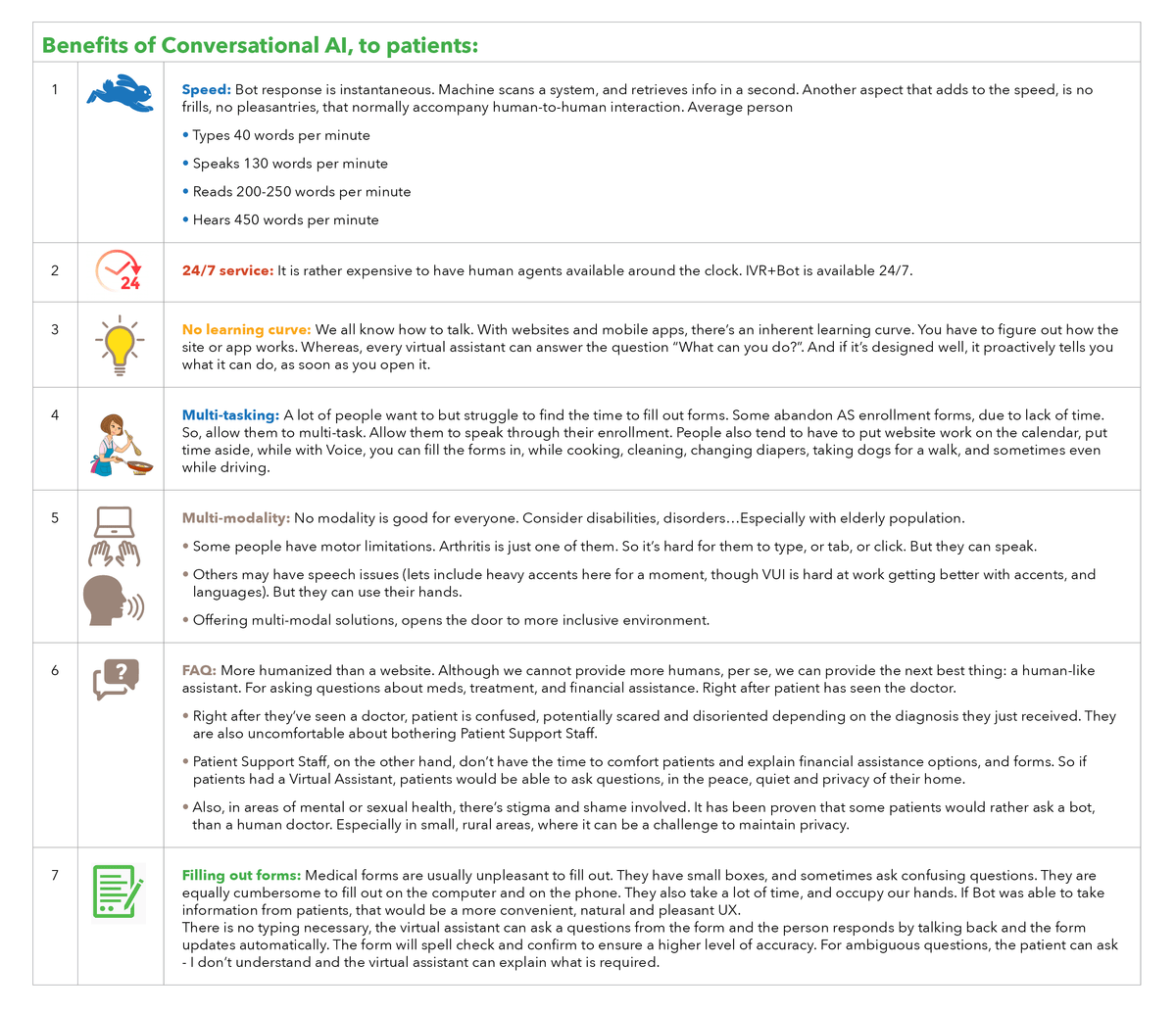
Benefits (of CUI, conversational UI) to the business:
1. Bot can help avoid incomplete forms and missing signature, and help avoid inaccurate spelling.
2. If humans have more time to help patients fill out their forms, and address impediments to enrollment, so the end result is increased enrollment.
3. If Bot can handle mundane and easy tasks, humans can handle more complex cases. And more of them, in shorter amount of time. So patients spend less time waiting in cue = less abandonment = increased enrollment.
4. Bot can answer some of the inbound calls, agents can spend more time spend on outbound calls = more patients reached = Outbound calls are usually following up with patients.
Accessible, inclusive and multi-modal
COVID reduced physical interaction between HCPs and patients, the amount, length and frequency of it. Patients are not in doctor's offices, clinics or hospitals (unless they have to be). As a result, interest and demand for DAs exploded in the healthcare space.
Sapient research showed that not all patients have a computer. Such as:
• elderly
• those who do not need it, who work with their hands (construction, cook, home healthcare aid, plumber, carpenter, etc.)
• those who do not know how to use a mouse or trackpad (elderly, mostly).
• those who cannot afford a computer
But everyone has a phone.
Not everyone has an email, or knows how to use it (elderly). So you need to find your patients where they are at. Just like you did with Secure Messaging. You skipped computers, websites, and emails and went straight to text.
Patients do not like interacting with GUIs (graphic user interfaces)
• One patient said that although she owns a laptop, she simply does not use it as much, cause it’s a “hassle”.
• Another patient said that she does not like using websites on her phone.
Lessons learned: find people where they are at: on their devices, using text and voice.
User stories & sample dialogs
Here are mockups for 3 potential Bot scenarios:
● Verbal consent
● Status update
● Triaging callsVerbal consent:
Frequent scenario: Case is in progress. The only thing that’s missing is Patient Consent. The client currently obtains consent by:● Patient signs the form online.
● Patient signs paper form, takes picture and submits the picture.
● Via phone, with a live agent – but that’s only temporary measure, during COVID.
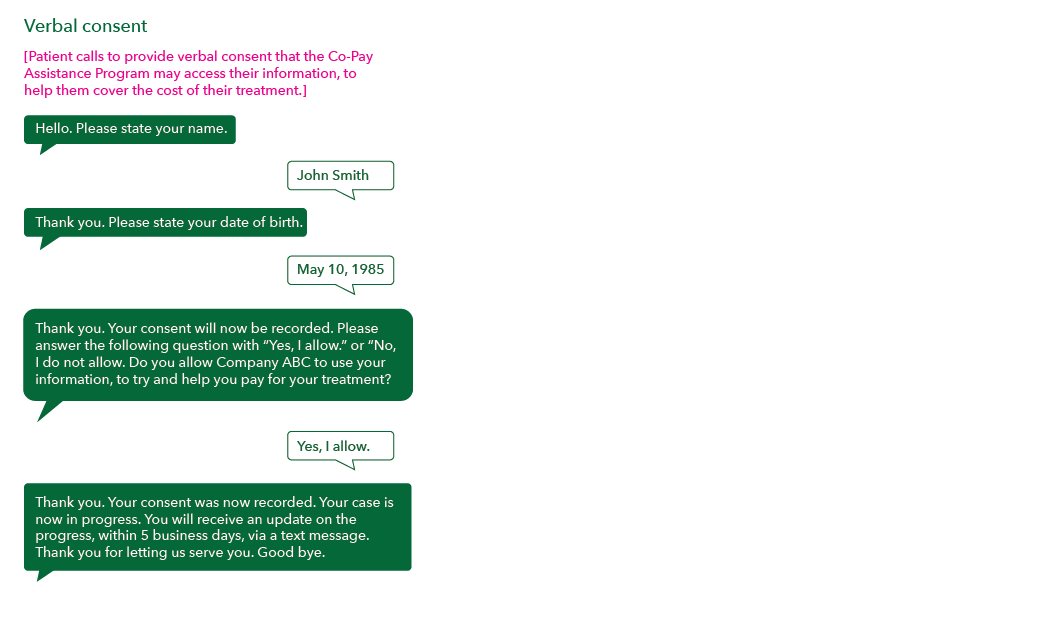
Client would like to enable Verbal Consent, and record it. Here’s how that can be achieved:
● Patient receives a text message, along the lines:
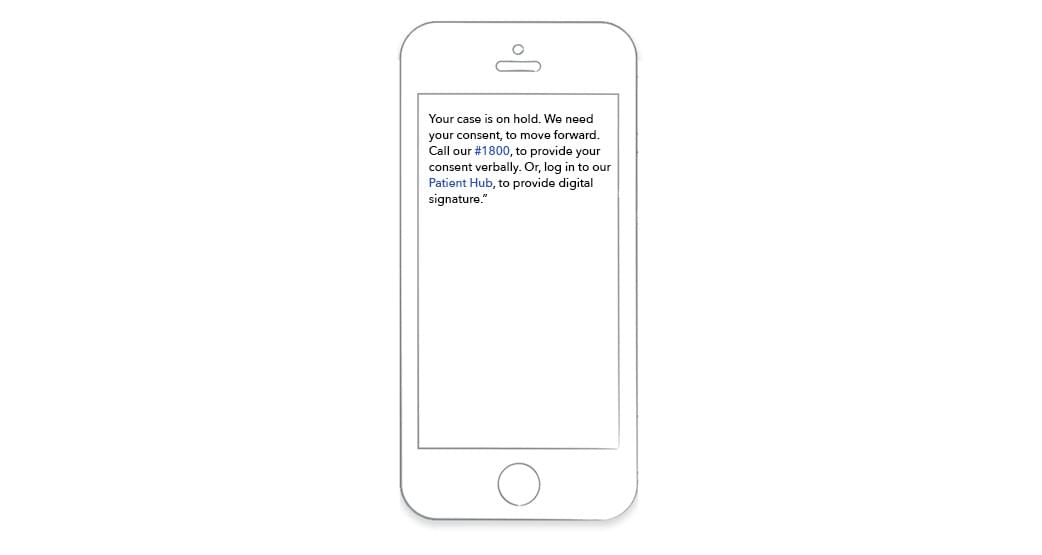
Logins are a problem In regards to the text message above, common obstacle to login-based websites, is that user does not recall their username and/or password. The route with the Bot circumvents that obstacle. As a reference point, as a means of identification, financial services and banks’ Bots today, create a voice imprint / identity, for each user, while the user is talking, for the first time. That’s the most up-to-date identification type in voice. For the purposes of the interaction shown below, we are going to use a more modest, traditional method, such as name, DOB and zip code.
Here's how Verbal Consent can be provided via chatbot:
Status update:
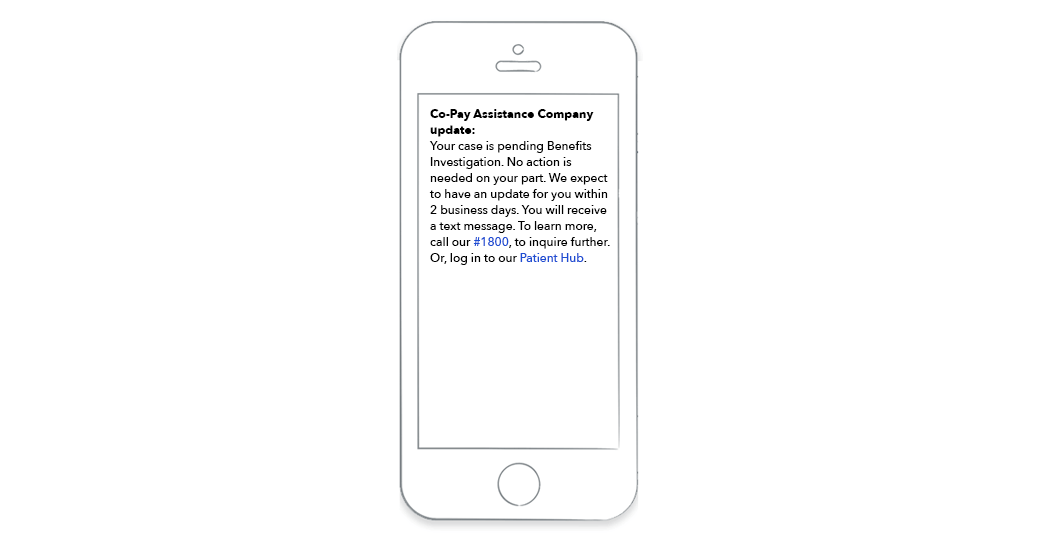
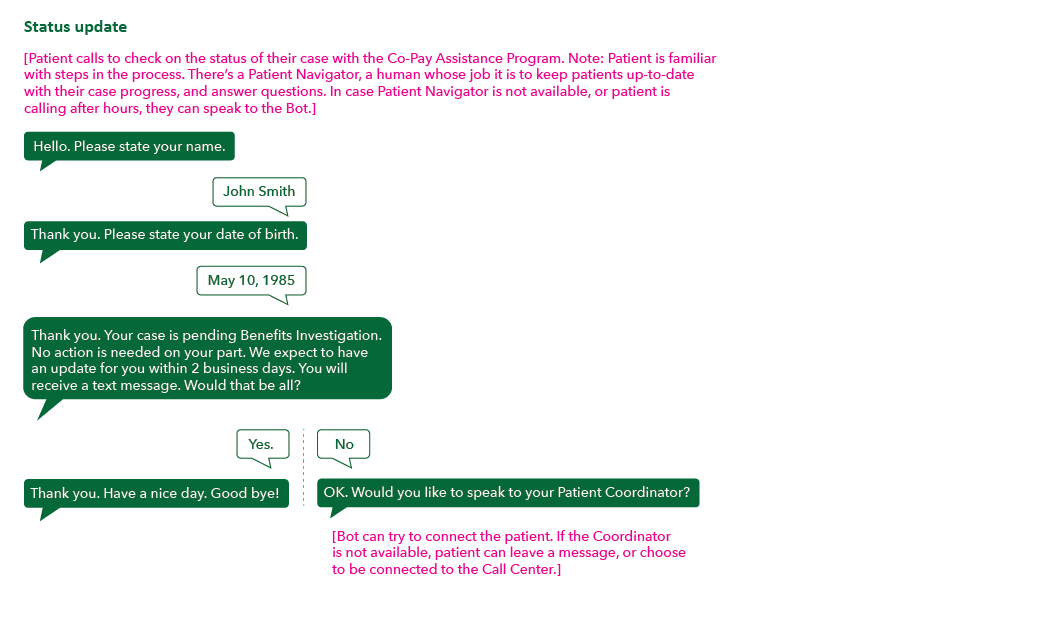
Frequent scenario: Case is in progress. Patient receives regular Status Update text messages, via the Secure Messaging system that’s already in place.Here are 2 common status updates from everyday life:
Amazon
Amazon updates that user receives via email or text. Please note the Amazon is being used as an example of concept, NOT content.
Status update #1: We received your request, and your package is being prepared.
Visit our website for more information.
User then opens the timeline in the app, if they have it installed on their device, or they go to Amazon’s mobile website, and use their login info, to view the complete timeline.
Status update #2: Your package is en route. Visit our website for more information.Status update #3: Your package has been delivered.
You can go online, or in your app, to check on details. In most cases, the brief text update would suffice.
Pharmacy
Either you receive automated text, or you call your pharmacy, to check on the status of your prescription.
You get 3 statuses:
Status update #1: You are out of refills. Would you like us to call your doctor?
Status update #2: Your prescription is being prepared. We’ll call you when it’s ready
Status update #3: Your prescription is ready for pickup.
If you still want to talk a pharmacist, you have that option. In most cases, the brief automated update would suffice.
Your patient can receive the same type of brief status update via text:
Or, if they call, Status Update can be provided via chatbot:
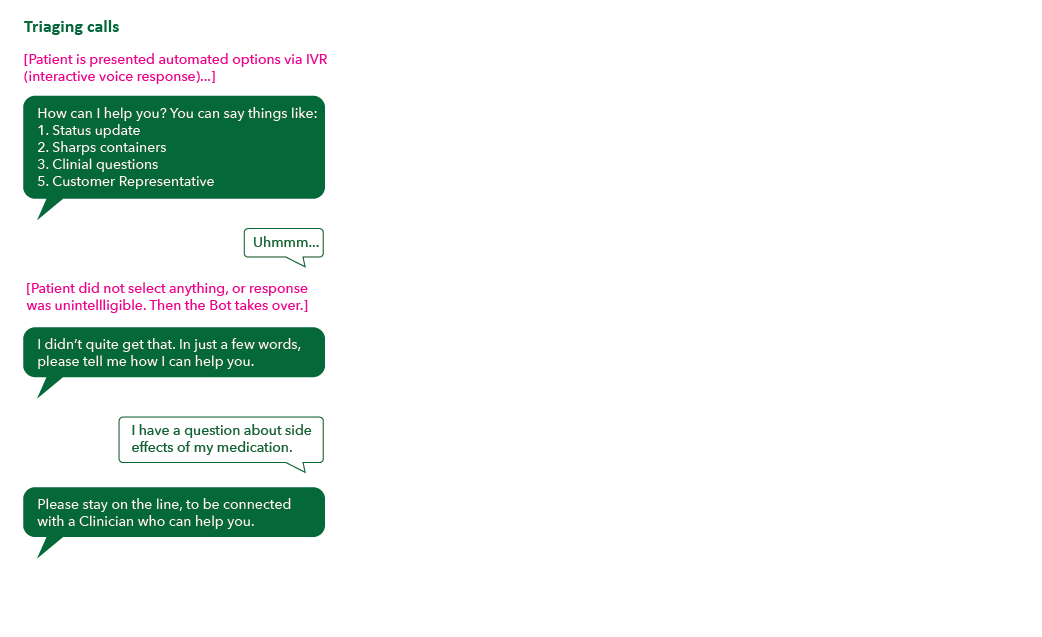
Triaging calls:
This is how triaging calls could look like:
Common question: how do we make our customers aware of conversational AI channels? How do we steer towards using these channels?
1. It needs to work and work well. Some of these channels patients will experience when they call on the phone. So no steering necessary.
2. It needs to bring value.
3. It should be advertised like any other new channel. And promote aspects where it's more convenient than human agents, such as 24/7 support, etc.
A virtual assistant to for FAQ and help filling out forms, would need to be declared to patients. Once they use it, the interaction needs to be smooth. Users are shown to exhibit less tolerance towards conversational products (than websites and mobile apps, for example), as they expect conversation to work seamlessly.
Related article:
UX has killed advertising: Product-led growth
Spotify - analysis of how customer support can be enhanced by conversational AI
SITUATION:
The majority (80%) of Spotify's help volume is coming from the Mobile Website & App. Typical help use cases that are very popular in the last 6 months include:
Account
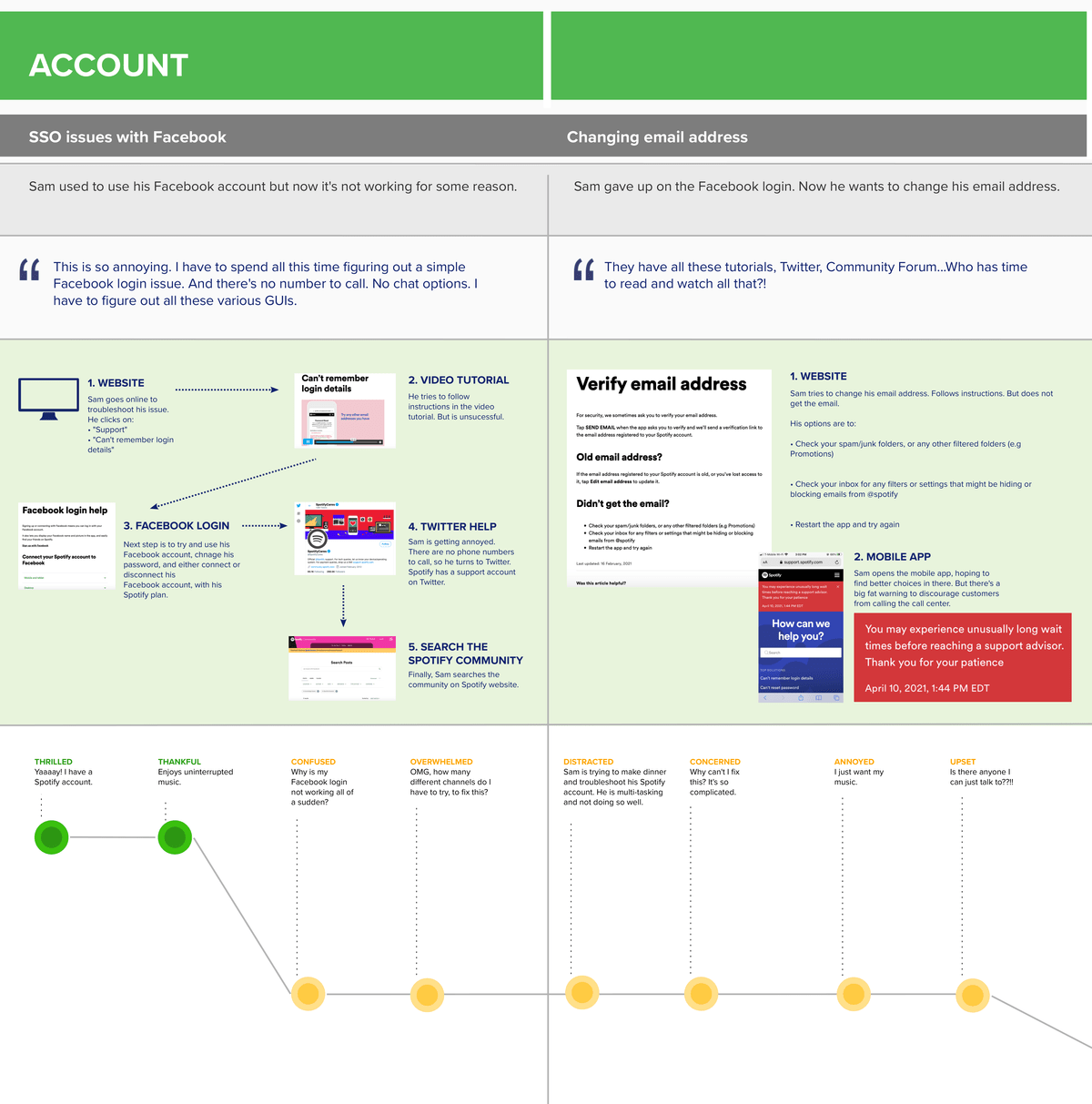
● SSO Issues with Facebook
● Changing an email addressPayments
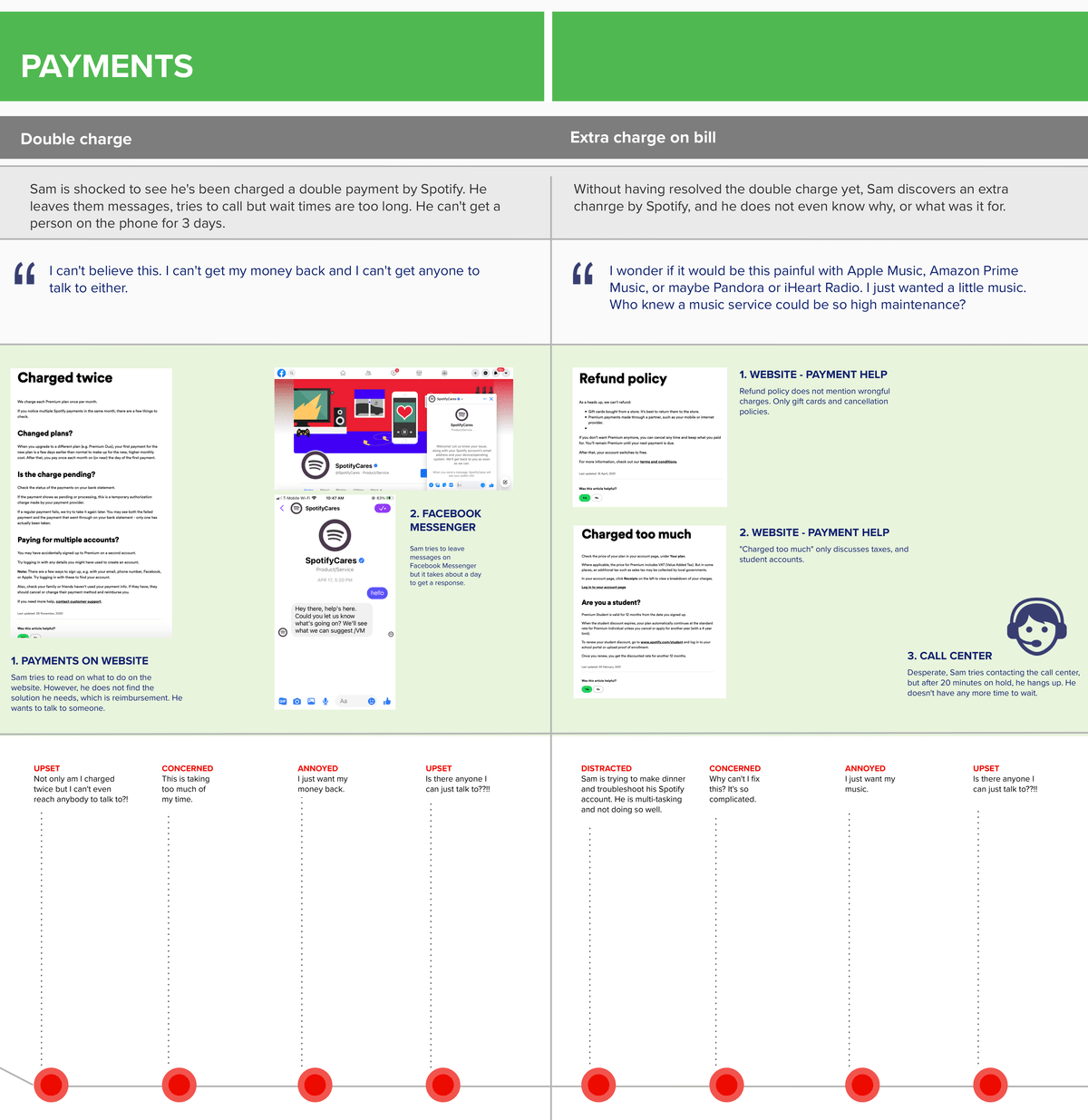
● Double charge or extra charge on bill
● Gift Card issuesGeneral Troubleshooting
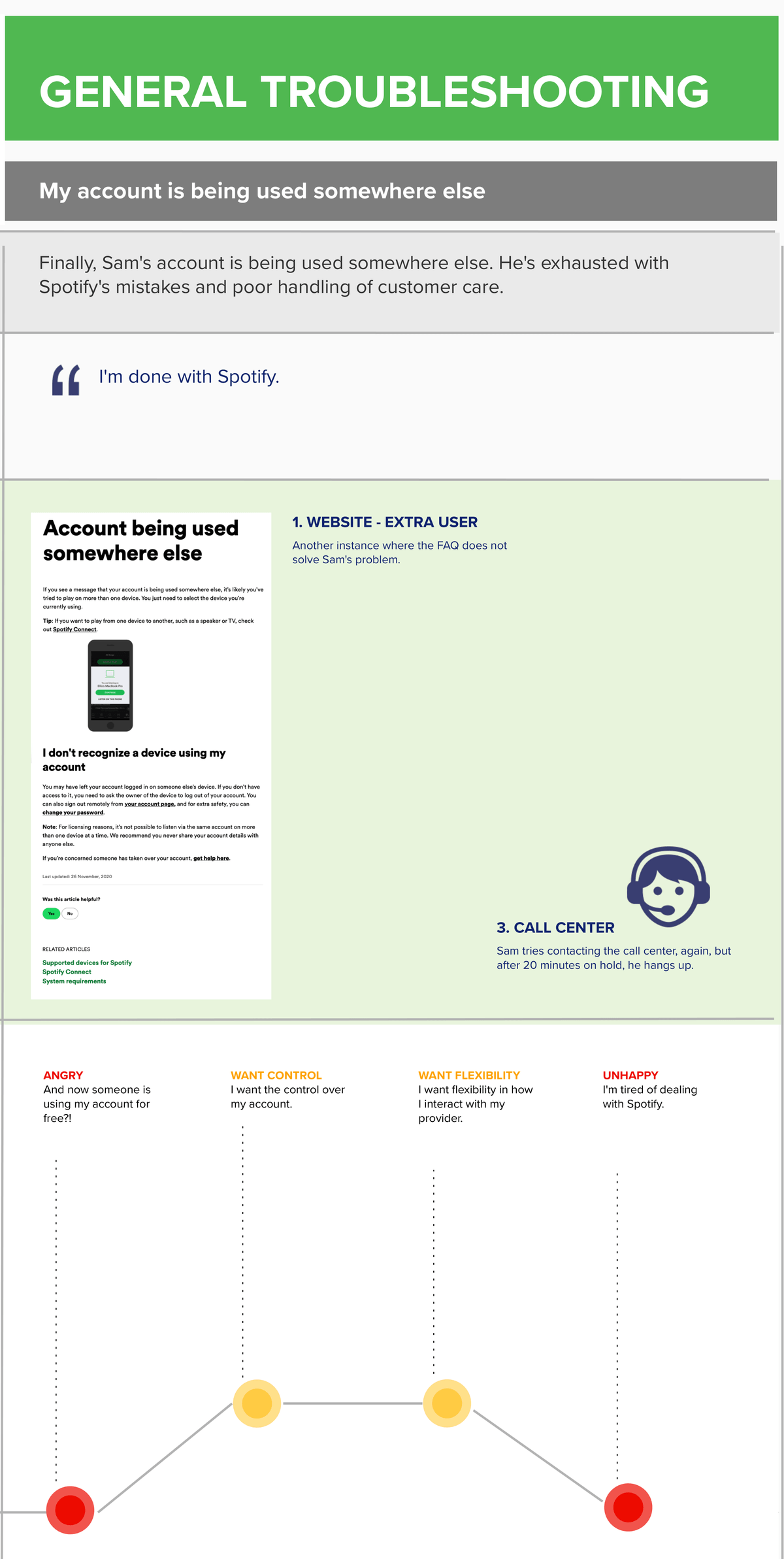
● My account is being used somewhere elseTASK:
I set out to uncover:
● Should Spotify use a static landing for contact options?
● Different ways users can be offered chat in different places, once on the support site.
● What are the trade-offs of each contact placement approach?ACTION:
● I researched current customer support channels and analyzed interaction of each
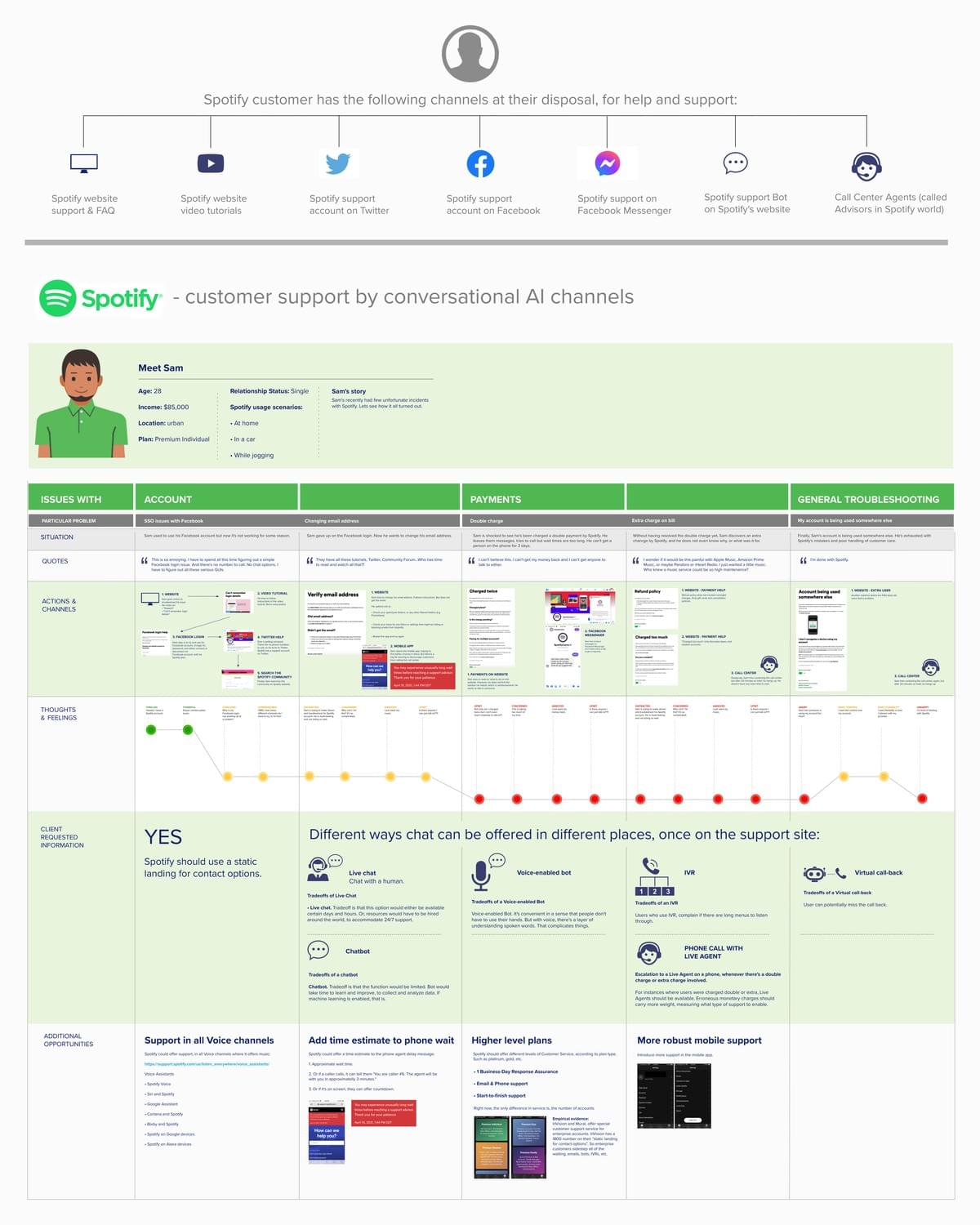
● I built a user journey, to outline and compare the experiences
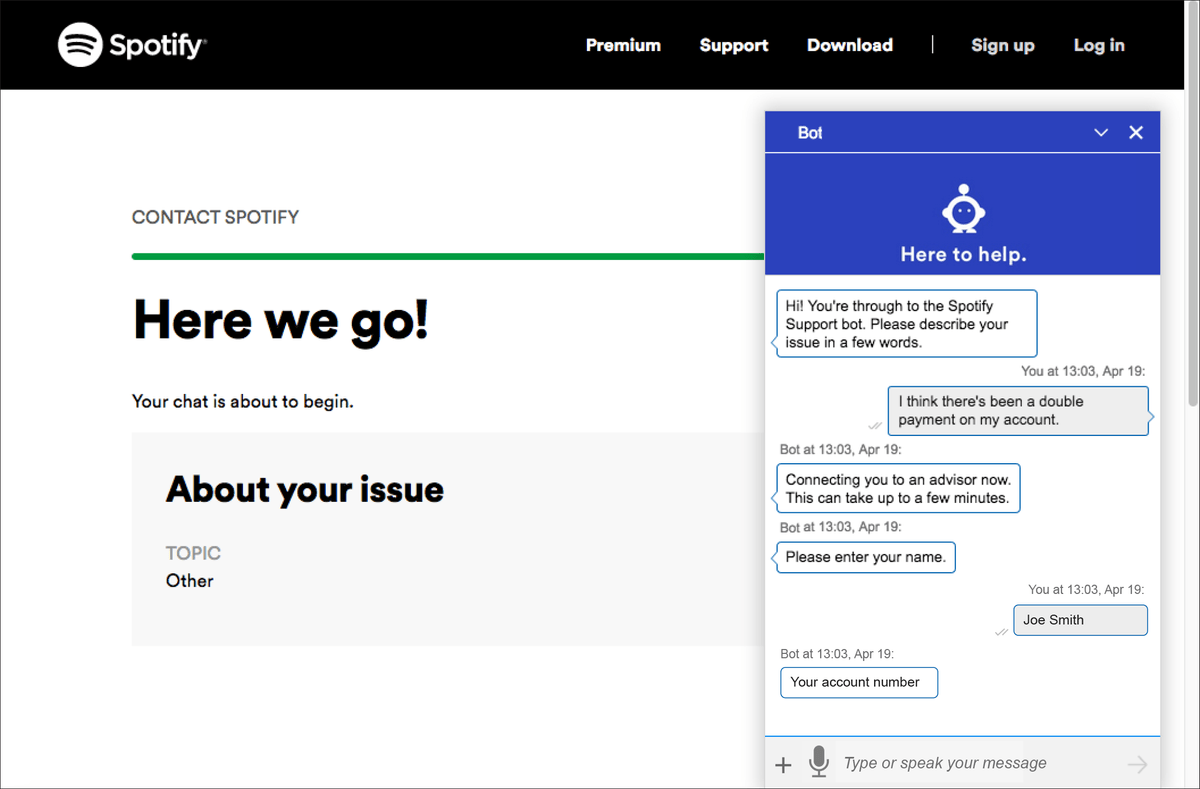
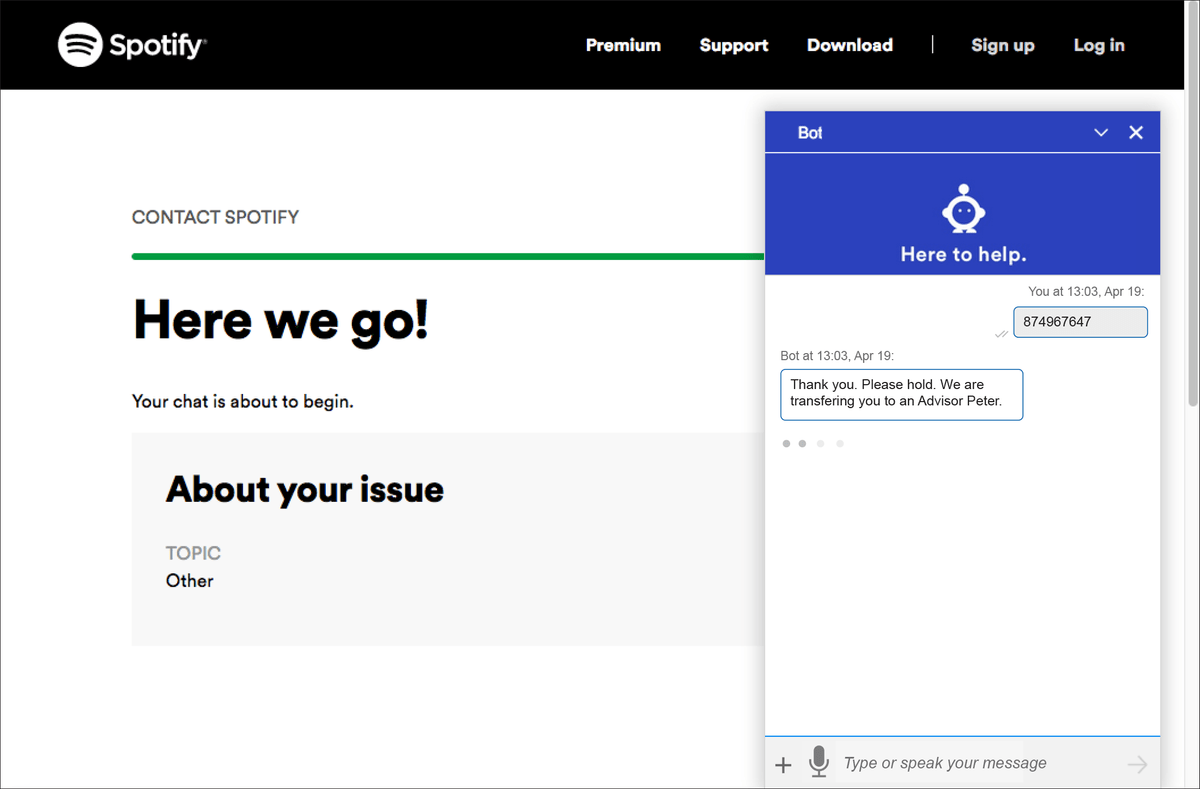
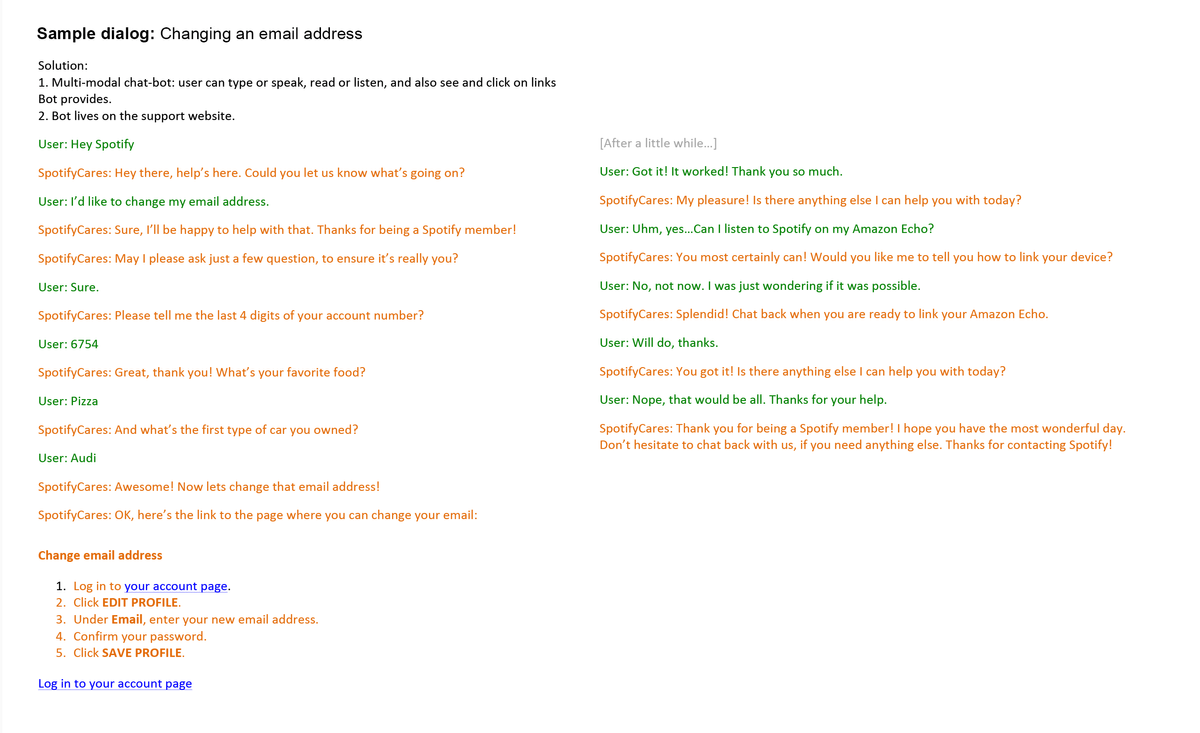
● I built 2 sample dialogs, to show how the interaction could work
● I outlined additional ways Spotify can monetize their customer support
RESULT:
Here's what I found:
● Yes, Spotify should use static landing page for contact options.
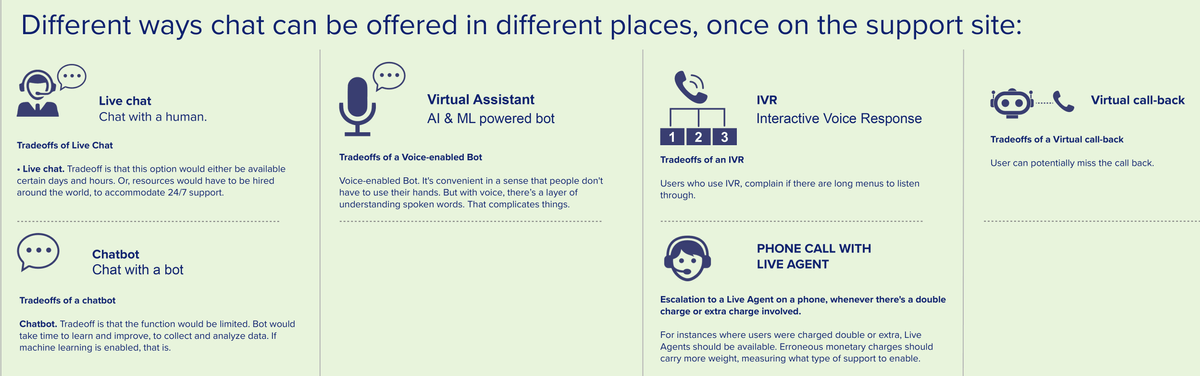
● Voice-enabled Bot. It's convenient in a sense that people don't have to use their hands. Trade-off is that with voice, there’s a layer of understanding spoken words.
● Chatbot. Trade-off is is that the function would be limited. Bot would take time to learn and improve, to collect and analyze data. If machine learning is enabled, that is.
● Virtual callback. Trade-off is that user has to answer that phone call (minor trade-off, in my opinion).
● Live chat. Trade-off is is that this option would either be available certain days and hours. Or, resources would have to be hired around the world, to accommodate 24/7 support.
● Escalation to a Live Agent on a phone, whenever there's a double charge or extra charge involved: For instances where users were charged double or extra, Live Agents should be available. Erroneous monetary charges should carry more weight, measuring what type of support to enable.
I identified the following Additional Opportunities:
1. Opportunity to improve Customer Satisfaction: Spotify should offer customer support, in all Voice Assistants, where it currently offers service (music):
● Spotify Voice
● Siri and Spotify
● Google Assistant
● Cortana and Spotify
● Bixby and Spotify
● Spotify on Google devices
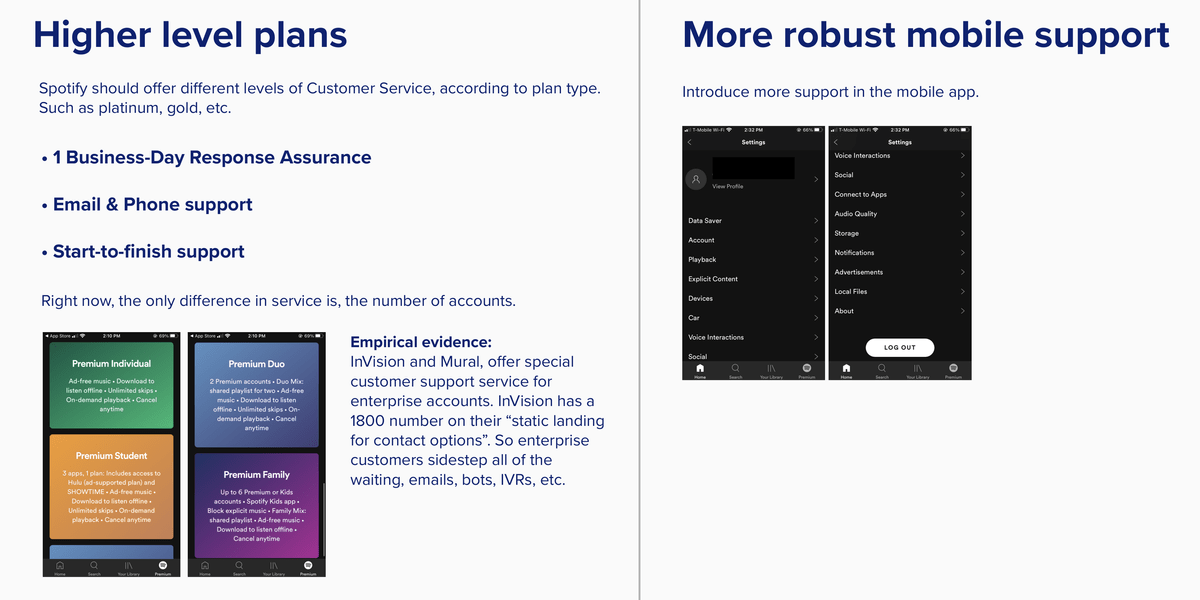
● Spotify on Alexa devices2. White glove service option. Opportunity to further monetize customer support. Spotify advertises 4 different plans, depending on number of accounts (single, couples, family). Each plan has certain features, such as ad-free music, downloads, skips, etc., but no plan mentions customer service. Specifically different levels of customer service. I would add highest level plans, such as Platinum, Gold, etc., and have those plans feature elevated customer support, such as:
● 1 Business-Day Response Assurance
● Email & phone support
● Start-to-finish support
Out-of-category exemplars: InVision and Mural offer 1-800 number with Live Agents, to its enterprise clients.Notes:
1. Full user journey is below. Smallest text you cannot read here. This is just to give you an idea of the overall flow.
2. Focused areas are below. There are sample dialogs underneath the Journey Map.
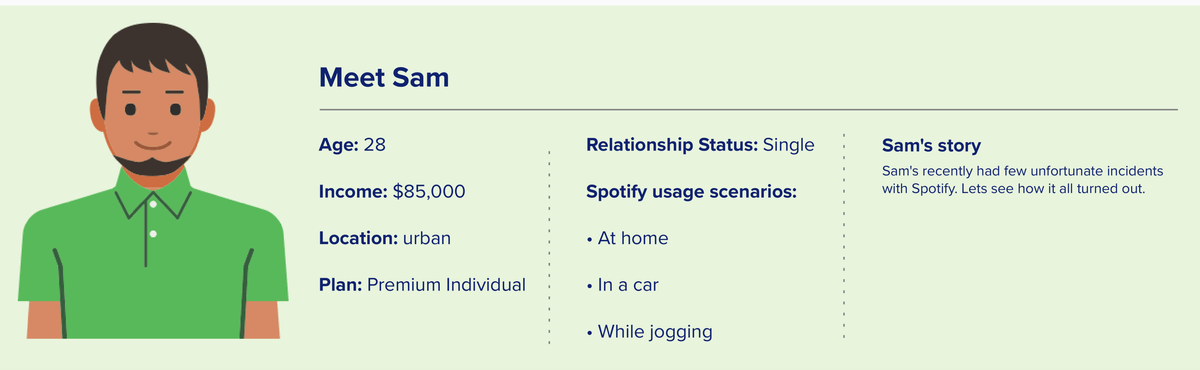
Introduction to our persona
Upper left: section names and issues with Account.
Upper middle: issues with Payments.
General Troubleshooting scenarios.
Main part: my ideas for improved Customer Service, and channels of how I think it should be delivered.
My additional ideas, outside of what client asked for. But what I thought would be of value. Set #1.
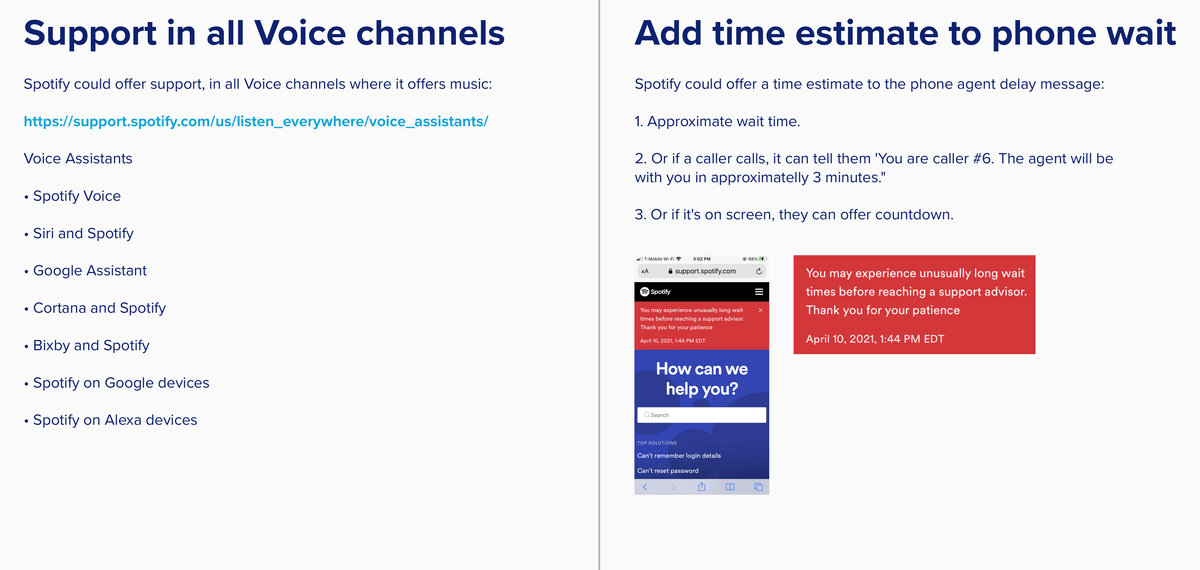
My additional ideas, set #2.
How would it look like implemented: